More Halloween Arduino Projects: Trick-or-Treat Button Monster and Motion-Activated Haunted Display
These projects extend the Box Monster workshop with a servo motor that moves a lightweight prop, such as a box lid, door, curtain, or sign. You can trigger the movement with a push button, a PIR motion sensor, an HC-SR04 ultrasonic distance sensor, or a combination of these inputs.
Workshop note: Projects 1 and 2 need additional components and a different Arduino sketch from the original Box Monster. Treat the wiring and code as a new build. Test the mechanism before adding decorations, and ask the instructor for help with wiring or code.
Shared design idea: Make the servo part of the character
The servo should look like it belongs in the Halloween decoration, rather than an exposed motor added afterward.
- Monster box: Hide the servo inside the box. Connect its horn to the lid with a short, lightweight cardboard or craft-stick linkage so the monster can pop open.
- Haunted door: Mount the servo behind a cardboard wall or doorframe. Attach the horn to a small hinge or lightweight flap.
- Curtain or tomb: Use the servo to pull a lightweight paper curtain, uncover a skeleton/eyeball, or lift a tombstone flap. A simple string linkage can work if it does not snag.
- Moving sign: Have the servo rotate a lightweight “BOO!” sign or reveal a hidden message.
- Hide the hardware: Cover the servo with a cardboard housing decorated as a stone, coffin, tree stump, monster body, or haunted-house wall. Leave enough clearance for the horn and linkage to move freely.
Keep the moving part lightweight, use a hinge where possible, and leave the servo horn and linkage clear of fingers, wires, and loose craft materials. Do not force the lid or servo by hand when the mechanism is powered.
Shared materials
- Arduino board and USB cable
- Breadboard and jumper wires
- One small hobby servo motor and its compatible mounting hardware
- A lightweight cardboard lid, door, flap, sign, or curtain
- Craft supplies available at the workshop, such as a box, ping-pong balls, eyeball balls, pom-poms, chenille stems, stickers, glitter foam shapes, twine, spiderweb decorations, or rubber bats
- Optional: LEDs and suitable resistors for eyes or accent lighting
- One or more trigger devices: push button, PIR motion sensor, and/or HC-SR04 ultrasonic distance sensor
- A suitable servo power supply if required by the servo; check the servo’s voltage and current requirements
Power and wiring safety: A servo can draw more current than an Arduino board’s 5 V pin can reliably supply. Follow the instructor’s wiring diagram and use a suitable supply when needed. If the servo has a separate supply, connect its ground to Arduino GND so the control signal has a common reference. Do not connect a motor’s power leads directly to an Arduino I/O pin.
Project 1: Trick-or-Treat Button Monster
Build a monster that waits for a visitor to press a button, then opens its mouth or box lid, reveals glowing eyes, or pops up a small “TRICK OR TREAT!” sign.
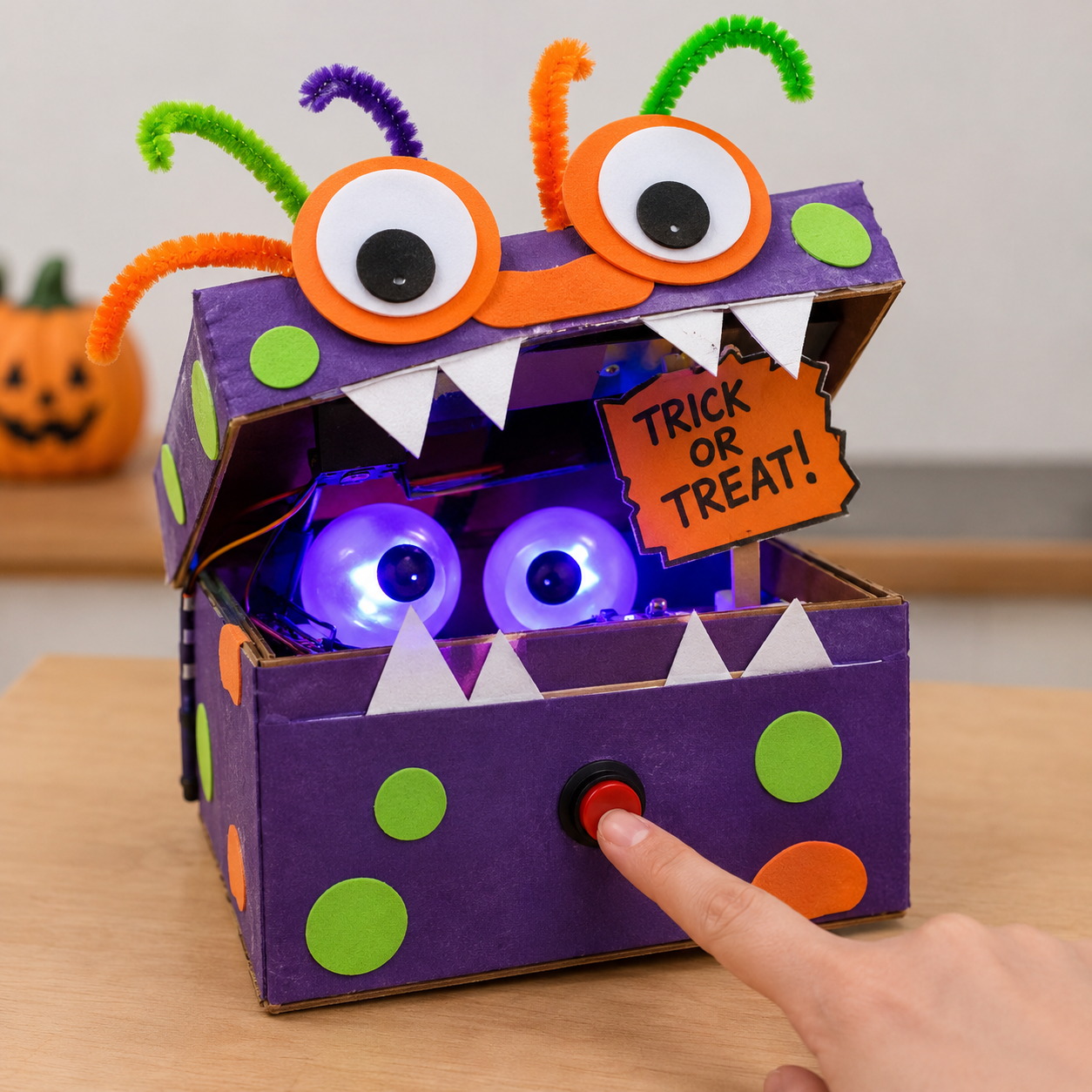
How it works
- The monster waits with its mouth or lid closed.
- A visitor presses a large, clearly labelled button.
- The servo opens the mouth/lid or raises a sign.
- Optional LEDs light up, and the monster can make a short sound if the workshop sound setup is used.
- After a short pause, the servo returns the moving part to its closed position.
What you need
- A small cardboard box or monster-shaped body with a lightweight hinged lid or mouth
- One servo motor, mounted inside the box or behind the monster’s face
- One push button, preferably mounted on a sturdy cardboard “Press for a surprise!” panel
- Arduino, breadboard, jumper wires, and an appropriate servo power arrangement
- Optional LEDs and resistors for glowing eyes; optional speaker/buzzer if supported by the sketch
- Craft supplies to create the monster’s face, teeth, tongue, claws, and button panel
Make it your own
- Build the monster body from a shoebox or another small cardboard box. Decide whether the moving part will be the lid, mouth, a small door, or a pop-up sign.
- Attach the moving part with a simple hinge. Make sure it opens easily by hand before installing the servo.
- Mount the servo inside the box or behind a cardboard panel. Attach the servo horn to the lid or mouth using a lightweight linkage. Ask the instructor to help position the servo so it does not push past the hinge’s natural range.
- Mount the push button where visitors can easily reach it. Keep the button and wires away from the moving lid and linkage.
- Connect the button and servo according to the instructor’s wiring diagram, then upload the Project C sketch. Test the servo movement before attaching decorations.
- Add eyes, teeth, a tongue, foam shapes, pom-poms, or chenille-stem horns. Make a decorative cover for the servo, but leave the moving parts free to travel.
- Test several times. Adjust the linkage or the open/closed positions in the sketch if the lid binds or the servo strains.
Decoration idea — “Feed the monster”: Make the button look like a candy button or doorbell. Give the monster a large cardboard mouth with foam teeth. When pressed, the mouth opens to reveal a paper tongue, glowing eyes, or a small candy-shaped sign. Keep real candy and small loose craft pieces away from electrical parts and young children.
Try this: Add a short delay before the mouth opens, blink the eyes while it is open, or let the visitor press the button again to close it.
Project 2: Motion-Activated Haunted Display
Create a haunted scene that reacts when someone approaches. A cardboard haunted-house door can swing open, a tombstone can lift, an eyeball can appear behind a flap, or a small ghost can rise from a box.
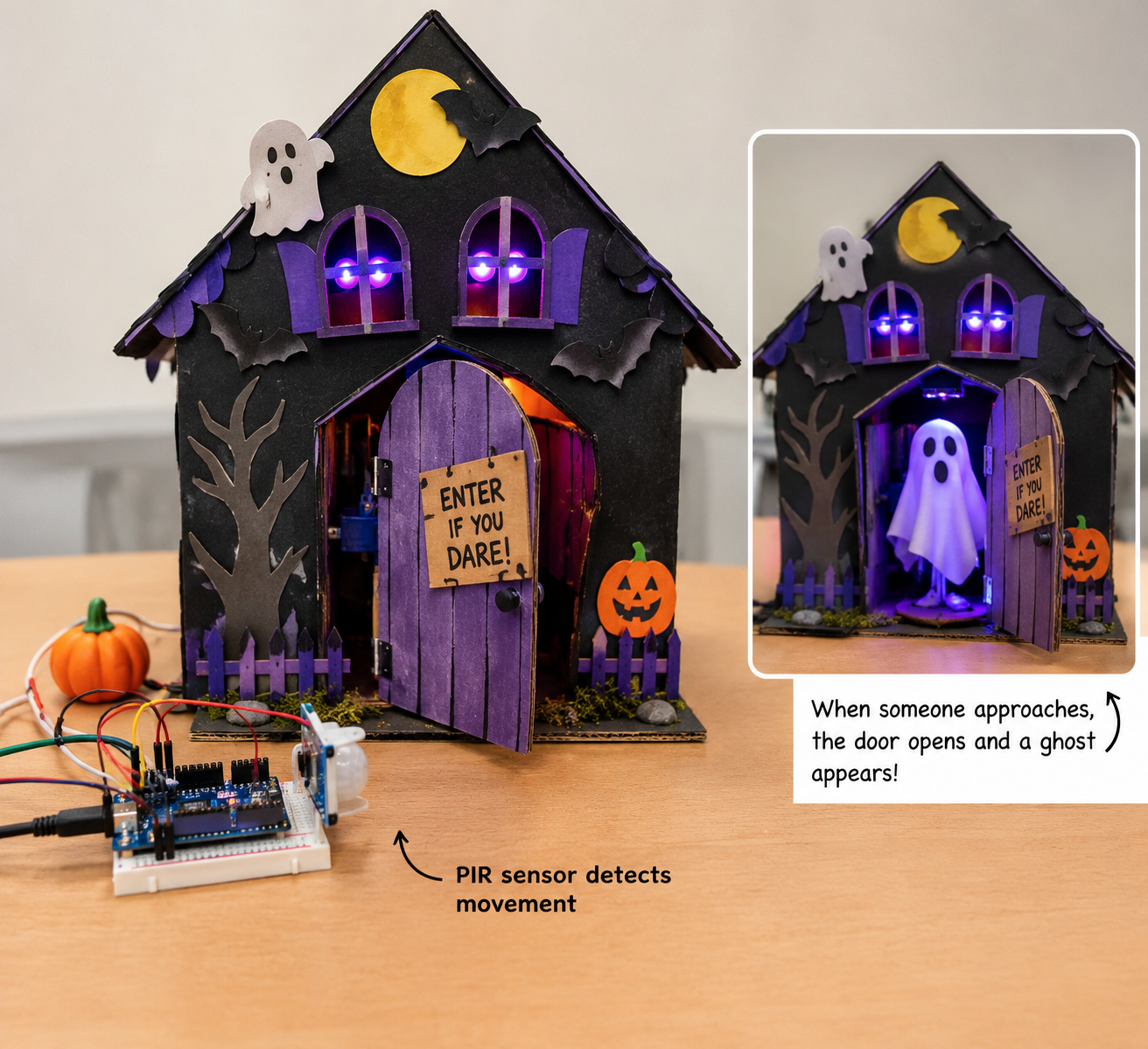
Choose a trigger
Use one trigger to start with, then add another if time allows.
- PIR motion sensor: Detects movement in its field of view. It is a good choice when the display should react as a person walks past. It does not measure exact distance, and its response can vary with the sensor and environment.
- HC-SR04 ultrasonic distance sensor: Measures the distance to an object in front of it. It can trigger the effect when a visitor comes within a chosen range, provided the sensor has a clear view and the target reflects the sound well.
- Push button: Provides a manual trigger for testing or for visitors who want to activate the display themselves.
- Combination: For example, use PIR motion to activate the display, an HC-SR04 to limit activation to someone standing close, and a button as a manual test/override. Combining sensors requires extra wiring and logic in the sketch; start with one sensor to keep the build manageable.
What you need
- A stable cardboard base or small haunted-house/tomb/crypt scene
- One servo motor and a lightweight moving part (door, flap, sign, curtain, or pop-up figure)
- One trigger device to start: PIR, HC-SR04, or push button
- Arduino, breadboard, jumper wires, and an appropriate servo power arrangement
- Optional LEDs and resistors for glowing eyes or scene lighting
- Craft supplies such as spiderweb material, eyeball balls, rubber bats, twine, stickers, glitter foam shapes, and cardboard
Make it your own
- Choose a simple scene: a haunted-house door, a tomb with a lifting lid, an eyeball behind a flap, or a ghost that rises from a box.
- Build a stable base and add a hinge or guide for the moving part. Keep the prop light enough for the servo to move without straining.
- Mount the servo behind a wall, inside a box, or beneath the base. Use a short linkage or string to move the prop, and test the range before adding decorations.
- Mount the selected sensor so it can detect visitors without being blocked by the decoration. For an HC-SR04, leave the two round transducers exposed and point them toward the approach area. For a PIR sensor, leave its white sensor lens unobstructed.
- Connect the sensor and servo according to the instructor’s diagram. Upload the Project D sketch and test the sensor readings and movement separately before combining them.
- Set the trigger behaviour: for example, open the door when motion is detected, keep it open briefly, then close it. Add a cooldown period so the servo does not repeatedly move while someone remains nearby.
- Decorate the servo housing as part of the scene: a stone wall, coffin, tree stump, haunted-house frame, or pile of “rubble.” Keep the sensor’s view and the servo’s movement path clear.
- Test from different distances and angles. Adjust sensor placement and the sketch with the instructor’s help if it triggers too easily or misses visitors.
Decoration ideas — choose one moving reveal:
- Haunted-house door: Put the servo behind a cardboard doorframe and connect it to a lightweight hinged door. Add a paper doorknob and fake stone blocks around the frame.
- Eyeball crypt: Hide an eyeball behind a small tomb lid. The lid lifts when someone approaches; LEDs behind the eyeball create a glowing effect.
- Spiderweb curtain: Mount a lightweight paper or fabric-like web curtain across a doorway. The servo pulls it aside to reveal a spider or eyeball. Keep loose webbing away from the horn and linkage.
- Pop-up ghost: Hide a paper ghost on a lightweight arm inside a box. The servo lifts the arm so the ghost appears over the top edge.
Try this: Make the display open only when someone comes close, then close after a few seconds. For an advanced version, require both PIR motion and a nearby HC-SR04 reading, or let a button trigger the same sequence manually.
Important: PIR and HC-SR04 sensors work differently and need different wiring and code. The original Box Monster sketch does not automatically support these sensors or the servo. Use a separate, instructor-tested sketch for Project 1 or 2, verify the servo’s safe travel range, and test the complete mechanism before the workshop. Keep moving parts lightweight and avoid pinch points.
Project 3: Haunted Clock — Motion-Activated Display
Make a spooky cardboard clock that reacts when someone approaches. Instead of opening a separate door underneath the clock, a round or curved section of the clock face rotates sideways to reveal a hollow window behind it. Two haunted eyes appear in the dark opening, LEDs make them glow, and a short spooky audio clip can play. When the effect finishes, the rotating section returns to cover the window.
Design note: The clock’s moving section is a rotating cardboard cover or shutter. It is not a hinged door below the clock. Keep the moving cover light, balanced, and clear of the fixed clock frame.
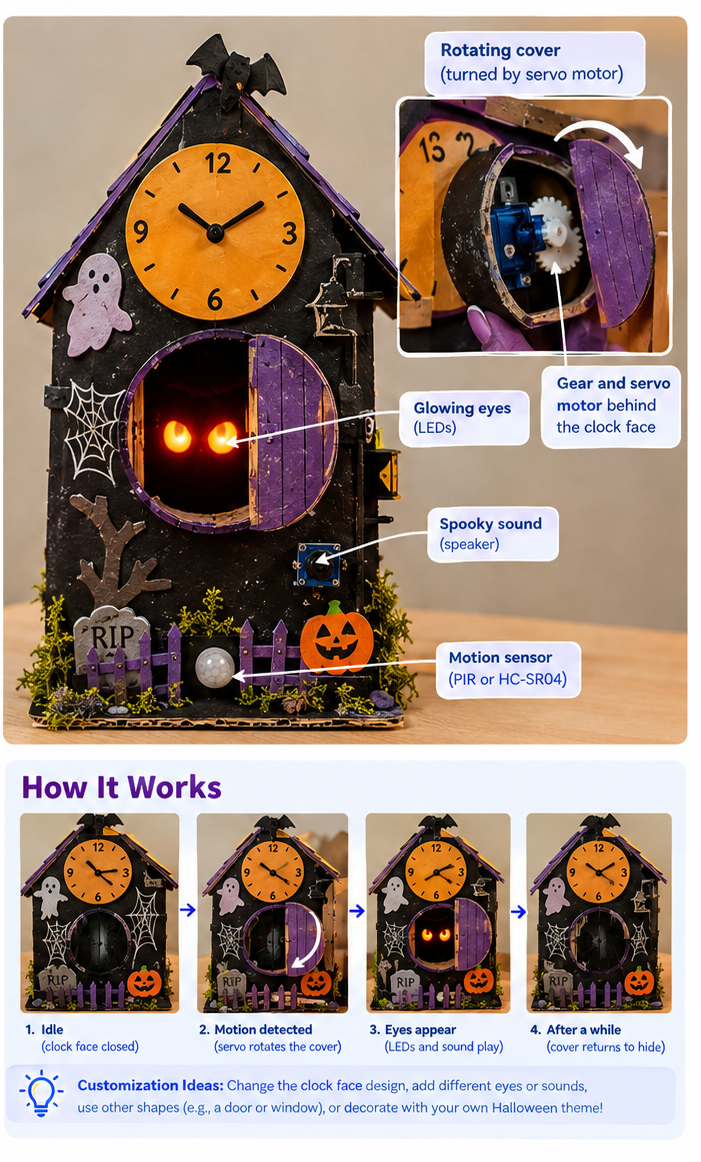
How it works
- The clock rests in its idle position, with the rotating cover hiding the hollow window.
- A PIR motion sensor detects movement, an HC-SR04 ultrasonic sensor detects someone within a chosen distance, or a push button provides manual activation.
- The servo and gear rotate the cardboard cover to one side, exposing the hollow window.
- Two eyes appear in the opening. Optional LEDs illuminate them, and a short spooky audio clip plays if the workshop audio setup supports it.
- After a short pause, the servo rotates the cover back to hide the eyes.
What you need
- Arduino board and USB cable
- Breadboard and jumper wires
- One servo motor and compatible gear parts from the DSC Arduino kits
- One trigger: PIR motion sensor, HC-SR04 ultrasonic distance sensor, or push button
- Optional: use more than one trigger if time and the sketch allow it
- One or two LEDs with suitable resistors for the eyes
- Optional audio playback hardware already used by the workshop’s other projects
- Corrugated cardboard for the clock body, clock face, rotating cover, hollow window, and stable base
- Craft materials such as paint, foam shapes, stickers, twine, spiderweb decorations, rubber bats, and eyeball decorations
- A suitable servo power arrangement, as recommended by the instructor
Build instructions
- Make the clock body. Cut a large clock shape from cardboard and attach it to a stable backing or base. Decorate it with clock numbers, hands, bats, cobwebs, a moon, or other Halloween details.
- Cut the hidden window. Behind the clock face, cut a hollow opening large enough to show two eyes. Add a short cardboard tunnel or recessed dark backing behind the opening so the inside looks deep and hides the wiring.
- Make the rotating cover. Cut a lightweight round or curved cardboard section that matches the clock face and is large enough to cover the window. Mount it so it can rotate sideways across the window. Check that it moves smoothly without scraping the fixed clock face.
- Install the servo and gear. Mount the servo behind the clock face or on the backing. Use the kit’s gear parts or a short linkage to connect the servo to the rotating cardboard cover. Keep the gear and linkage behind a separate decorative layer where possible, but leave enough space for them to turn freely.
- Test the motion first. With decorations still off, move the cover between its hidden and reveal positions. Set safe movement limits in the sketch so the servo does not push against the cardboard stops or grind the gears.
- Add the eyes. Place two paper, foam, or ping-pong-ball eyes inside the hollow window. Add LEDs behind or beside the eyes if desired. Secure the LEDs and wires so they cannot touch the rotating cover or gears.
- Add the trigger. Mount the PIR sensor where its lens has an unobstructed view of approaching visitors, or point the HC-SR04 at the approach area with its two round transducers exposed. Alternatively, mount a push button on the clock base for manual activation.
- Connect and program. Connect the servo, selected sensor or button, and optional LEDs/audio hardware using the instructor’s wiring diagram. Upload a separate Project D sketch; the original Box Monster sketch will not automatically support this mechanism.
- Add the sound effect. If compatible audio hardware is already available in the workshop, trigger a short spooky sound when the cover reveals the eyes. Reuse the same audio playback method or clip used by the other workshop projects rather than assuming a bare Arduino can play audio directly.
- Finish and test. Decorate the servo housing as part of the clock tower, a stone wall, a gear compartment, or a pile of “old clockwork.” Run several complete trigger–reveal–hide cycles and adjust the sensor range and timing.
Make the servo and gear part of the craft
- Haunted clockwork: Add a cardboard side panel decorated with drawn gears, rivets, and bolts. Make it look like an old mechanism housing while leaving the real gears room to move.
- Rotating clock face: Decorate the moving cover as a section of the clock dial so it blends into the face when closed. Add matching numbers or painted cracks to help disguise the seam.
- Hidden window: Paint the recessed cavity matte black or line it with dark paper. Place the eyes farther back so they seem to be looking out from inside the clock.
- Glow effect: Use red, green, purple, or blue LEDs behind the eyes. Keep the LEDs fixed to the backing rather than attached to the rotating cover, unless the wiring has been designed to move safely.
- Hide the electronics: Use a cardboard clock tower, tombstone, or “clock repair” panel to conceal the Arduino and wiring. Leave access to the USB port and reset button.
- Add sound: Put the speaker behind a decorative grille or paper “vent.” Keep the speaker opening clear so the sound is not muffled.
Choose a trigger
- PIR motion sensor: Best for a display that reacts as a person walks by. It detects movement, not exact distance.
- HC-SR04 ultrasonic sensor: Best when you want the effect to activate when someone is within a chosen distance. Aim it at the approach area and test its range with the actual display.
- Push button: A simple manual trigger and a useful fallback for testing.
- Combined triggers: For example, PIR can detect movement and the HC-SR04 can confirm that a visitor is close. A button can also activate the sequence manually. Combining inputs requires additional wiring and sketch logic, so begin with one trigger.
Try this: Change the eye colour, use different clock designs, make the cover rotate in the opposite direction, or adjust how long the eyes remain visible before the cover closes.
Preparation and safety notes
- Pre-cut the clock body, window, rotating cover, and base before the workshop if time is limited.
- Test the servo and gear assembly before decorating. Cardboard should not rub against the gears or place too much load on the servo.
- Keep the rotating cover light and leave a small gap around its edges so it cannot bind against the clock frame.
- Secure all wiring away from the gear train and rotating cover. Do not put fingers near moving gears while the project is powered.
- A servo may draw more current than an Arduino board’s 5 V pin can reliably provide. Follow the instructor’s power guidance; if using a separate servo supply, connect its ground to Arduino GND.
- PIR, HC-SR04, push-button, servo, LED, and audio setups use different wiring and code. Test each part separately and use an instructor-tested sketch for the chosen combination.
Workshop note: The images are concept references, not verified wiring diagrams or tested mechanical plans. Gear dimensions, servo mounting, sensor placement, and code will need to match the actual components in the DSC Arduino kits. Keep the audio system consistent with the setup already used by the other projects.