File and Directory Paths
Before we jump into some Unix commands, it’s worth defining two key terms:
Files: Objects on a computer that store data, information, settings, or commands when used with a computer program.
Directories: Also called “folders”, are the units that hold files or other directories.
Paths
A path is a string of characters that specifies a unique location in a directory hierarchy. A file path specifies the location of a file in a computer’s file system structure.
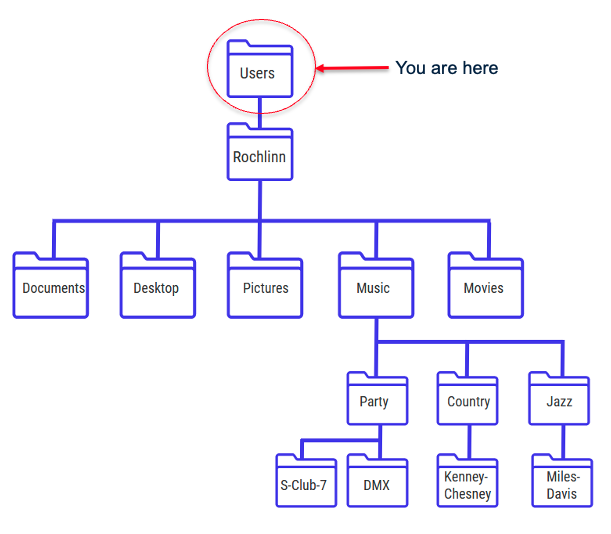
The below picture illustrates the directory structure of a typical computer. Within this structure, the path to my Desktop would be:
/Users/Rochlinn/Desktop
When dealing with paths, directories are denoted by a slash “/”, and each “layer” of the directory hierarchy is separated with a slash.
Exercise 1
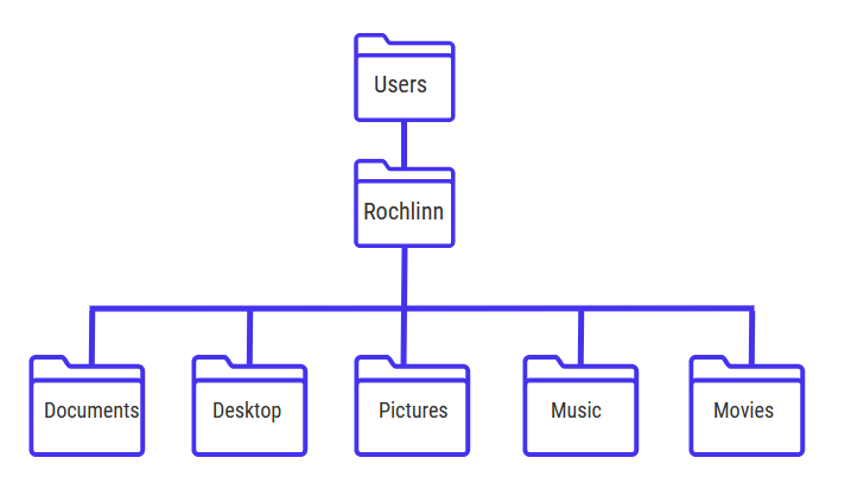
Take a look at the directory structure below:
- What’s the path to the Music directory?
- What’s the path to the S-Club 7 directory?