Pre-Workshop Videos & Activities
This workshop is primarily hands-on practice with NVivo in order to learn to use key features of the software. To participate fully please do the following before the workshop:
- REQUIRED: Install NVivo on your computer:
- You can download an NVivo trial version.
-OR- - UVic graduate students, faculty, and staff can access NVivo through the Online Services Portal.
- To activate NVivo:
- In Online Services, expand “NVivo – Status: Active” under Your Services.
- Click Manage.
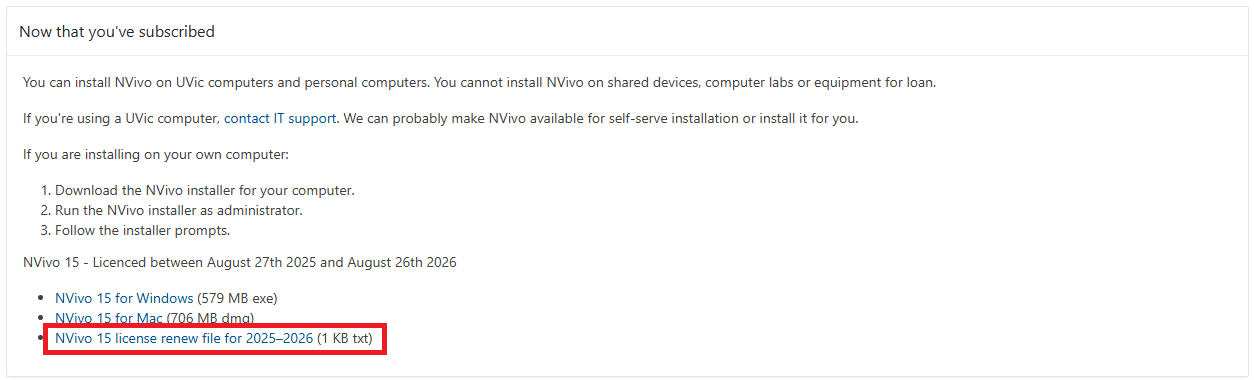
- Download the NVivo 15 licence file. If you have not already installed NVivo 15, download and install the appropriate Mac or Windows version.
- Open NVivo 15.
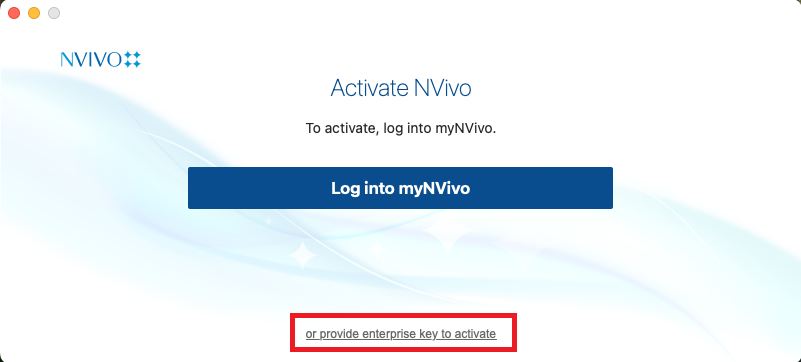
- If the Activate NVivo window appears, select “or provide enterprise key to activate.”
- Enter the licence key provided in the NVivo 15 licence file.
- You can download an NVivo trial version.
- OPTIONAL: Introduction to NVivo video (7 min)